

SOTI MobiControl & XSight – Handheld Device Management
Manage your handheld fleet with SOTI MobiControl and XSight: track devices, cut losses, avoid needless purchases and update centrally. Book a demo.
SOTI MobiControl & SOTI XSight
Handheld device management: visibility, control and savings across the entire lifecycle
Turn a scattered device fleet into a measurable, managed asset. Know which devices you have, where they are and whether they are in use.
Contact an expert See the savings model- Active
- Underused
- Lost
What centralized handheld device management means for your business
Savings come from lower device loss, avoiding unnecessary purchases, more efficient remote support, and centralized security and update management.
Better investment control
Know which devices you have, where they are and whether they are in use.
Lower device loss
Location and geofencing features help prevent devices from going missing.
Lower operating costs
Remote management and diagnostics reduce manual IT work and downtime.
Lower security risk
Consistent security policies and centralized distribution of app, operating system and security updates.
Four questions about your device fleet – and how SOTI answers them
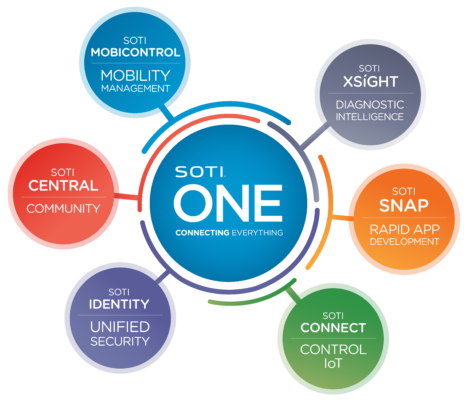
SOTI MobiControlCentralized fleet management: devices, locations, settings, security and updates in a single view.
SOTI XSightCompletes the solution with diagnostics, analytics and support tools, so issues can be resolved remotely.
Do you know how many handheld devices you have?
- Challenge
- Device counts are often based on purchase history or separate lists that don’t reflect actual usage.
- Solution
- MobiControl brings all managed devices into a single view. For each device you can see, for example, its status, location, operating system version and connection status.
- Savings impact
- Fewer unnecessary purchases once active, inactive and devices due for retirement are identified separately.
Do you know how many handheld devices go missing each year?
- Challenge
- Losses are often noticed late, making a missing device hard to trace and forcing a replacement purchase.
- Solution
- MobiControl shows a device’s current and last known location. Geofencing can trigger an alert or action when a device leaves a defined area. Devices can also be locked remotely.
- Savings impact
- Fewer replacement purchases and lower security risk from lost devices.
How do you know your stores don’t have too many devices?
- Challenge
- Devices are bought just in case, even though part of the fleet may be rarely used or not used at all.
- Solution
- XSight operational analytics show device usage and performance. Underused devices are identified and redeployed.
- Savings impact
- Higher utilization, a smaller total fleet, and postponed or avoided investments.
How are security and update distribution handled?
- Challenge
- Manual updates, inconsistent settings and unauthorized apps increase risk and IT workload.
- Solution
- MobiControl enables centralized security settings, kiosk and lockdown policies, remote locking, and controlled distribution of app, operating system and security updates. Updates can be tested and targeted to specific device groups.
- Savings impact
- Less on-site support and manual work, a more consistent fleet, and lower security and downtime risk.
Savings model and KPIs for management
A business case in euros is best built on your company’s own device counts and costs. The model makes the benefits visible without assumptions.
| Savings area | Calculation principle | Recommended metric (KPI) |
|---|---|---|
| Device loss | Reduction in lost devices × device replacement cost | Lost devices per year and loss rate |
| Excess device fleet | Avoided device count × purchase price and lifecycle cost | Active devices / total devices |
| IT support | Reduced support hours × internal or external hourly cost | Cases resolved remotely and average resolution time |
| Downtime | Reduced downtime hours × business impact of downtime | Device availability and downtime |
| Update management | Labor and travel costs saved through centralized distribution | Update coverage and update lead time |
| Security risk | Avoided incidents and remediation | Compliant devices and open risks |
How to proceed: from pilot to decision
The benefits are verified with your own data before a wider rollout.
Measure the baseline
Device count, annual loss, utilization, support hours and update coverage.
Run a limited pilot
In selected stores or warehouses.
Compare after 8–12 weeks
Loss, utilization, support time and update success compared with the baseline.
Decide on rollout
Based on realized savings and reduced risks.
Shall we start by measuring your baseline?
Optiscan helps plan and deploy SOTI pilots across the Nordics and Baltics.